Usually when a warehouse receives an inbound delivery, they scan the stock on their WMS, and assigns a bin for putaway. However, due to bin blockage or inaccessibility, the operator drops the pallet into another empty location to keep the dock running. Remember, this move isn’t confirmed or recorded.
A few hours later, when pickers arrive to get the product for delivery at the system-assigned location, they find unit shortage. Here the inventory management problems start. Put-away, picking, replenishment all departments get involved to scrutinize the mismatch, but ends up with nothing concrete.
Warehouse inaccuracy can be caused by smallest of the errors like wrong put-away, label mix-up, or impulsive replenishment. But these inventory management issues lead to major roadblocks and delivery delays which accumulate to bigger business struggles.
To fix inventory management issues, we will understand reasons for mismatch and then explore practical corrections for warehouse mistakes.
Table of Contents
What an Inaccurate Warehouse Looks Like?
Warehouse inaccuracies happen when the system shows stock in one bin, but it is sitting in overflow. Or a picker closes the task with picking the wrong variant. In such scenarios, everything on the dashboard looks fine but doesn’t match what’s on the floor.
These inaccuracies result in a mismatch between the physical count and what the WMS records show. These inventory management problems are usually caused by a series of small gaps across all warehouse operations. One gap may be manageable, but if repeated across shifts it leads to problems like false availability, short picks, recounts, and constant stock checks.
Inaccuracies throw some early signs of mismanagement before showing up at scale. Like the same SKUs get adjusted again and again, pickers ask for frequent overrides, or the returns stay too long in staging. These are not isolated mistakes, but show a growing gap between the system records and the actual warehouse situation.
Physical Count vs WMS
A physical inventory count shows what is actually present in the warehouse with real placement. Whereas, the Warehouse Management Software shows what stock quantity should be at any particular location of the warehouse based on recorded activity. It’s important that physically collected and WMS data must match for health inventory management. When data doesn’t match, it means some warehouse actions happened wrongly, late, or outside the correct process or guided method.
-
Shelf Reality
A physical shelf count shows stock quantity present physically in the warehouse at any designated location. Shelf count does not depend on any past entries but what’s truly there and what’s actually on the shelf, in the bin, or in the staging area.
-
System Memory
The WMS is the digital version of warehouse stock/activity history with clear dashboards. WMS tracks receipts, put-away, picks, transfers, returns, and adjustments across the storage facility. WMS shows accurate data resembling the actual floor count if all transactions recorded properly.
-
Different Roles
Shelf count and WMS must not be used against each other. The physical count checks are meant to current situation and the WMS explains what the operation believes happened over time based on digital records. One confirms present physical stock and the other reflects process accuracy and how each movement in warehouse is recorded.
-
Common Breaks
In most cases, the mismatch starts from a few common inventory management issues. Sometime, stock may be received incorrectly, may be moved without confirmation or may be picked from the wrong bin. All these mishaps cause breakage in the optimal process that causes physical count and WMS differences.
-
Root Tracking
Stock reconciliation is not just about recounting the goods stored. A recount can show an error, but doesn’t explains the reason behind inaccuracy. The concrete solutions comes after tracing down the exact point where physical and system records stopped matching.
Test how barcode capture, cycle counts, and location tracking help teams reduce warehouse mistakes before they compound.
Try WareGoWhy Shelves & WMS Records Start to Mismatch?
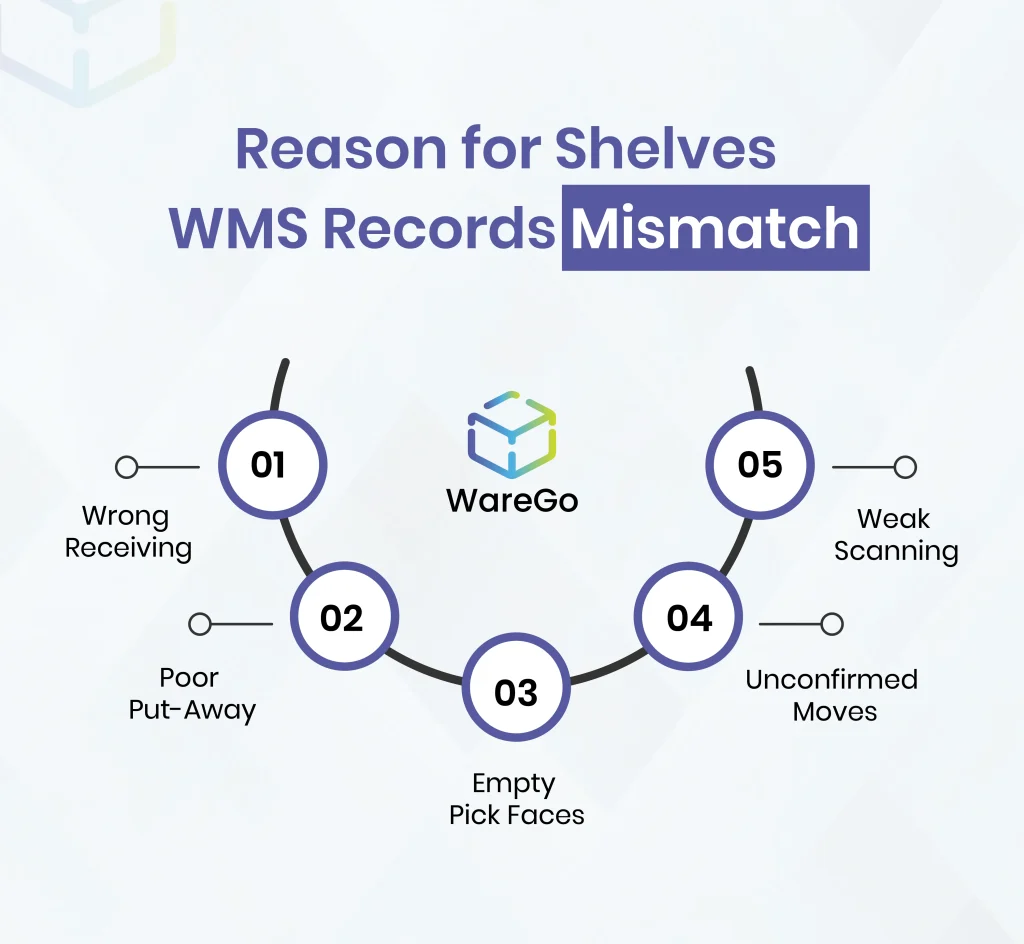
Shelf count and system records mismatch is a result of small process misses in daily warehouse management tasks. Smallest of the errors like, one wrong scan, rushed move, or unconfirmed system update slowly throws inventory control off the track in any warehouse.
-
Wrong Receiving
Inventory drift often starts at the receiving stage when inbound stock is booked under the wrong SKU, quantity, unit, or condition. In these scenarios, the system begins with feeding and showing bad information than the shelf and everything starts looking inaccurate later, but the actual mistake started at the dock.
-
Poor Put-Away
Let’s say, stock is supposed to go into the assigned location ‘Bin A’ and get confirmed there. However, during rush hours team places goods in the nearest empty space that is ‘Bin D’ to save time. That quick decision creates confusion for the future as the item is inside the warehouse, but not where the system data says it is.
-
Empty Pick Faces
This problem shows up when reserve stock is available, but the picking location is empty. On screen, the item still looks available. On the floor, the picker finds nothing in the slot. That mismatch wastes time and creates unnecessary stock-checking.
-
Unconfirmed Moves
Inventory gets moved all the time during busy shifts. It may go to overflow, staging, or a temporary holding area. When those moves are not confirmed properly, the system does not follow the product. Now the stock has moved physically, but not digitally.
-
Weak Scanning
When scans are skipped or labels are unclear, inventory stops being traceable. Staff then rely on memory or assumptions to finish the task. That may keep work moving for the moment, but it weakens record accuracy and creates larger issues later.
5 Warehouse Mistakes That Quietly Keep Counts Wrong
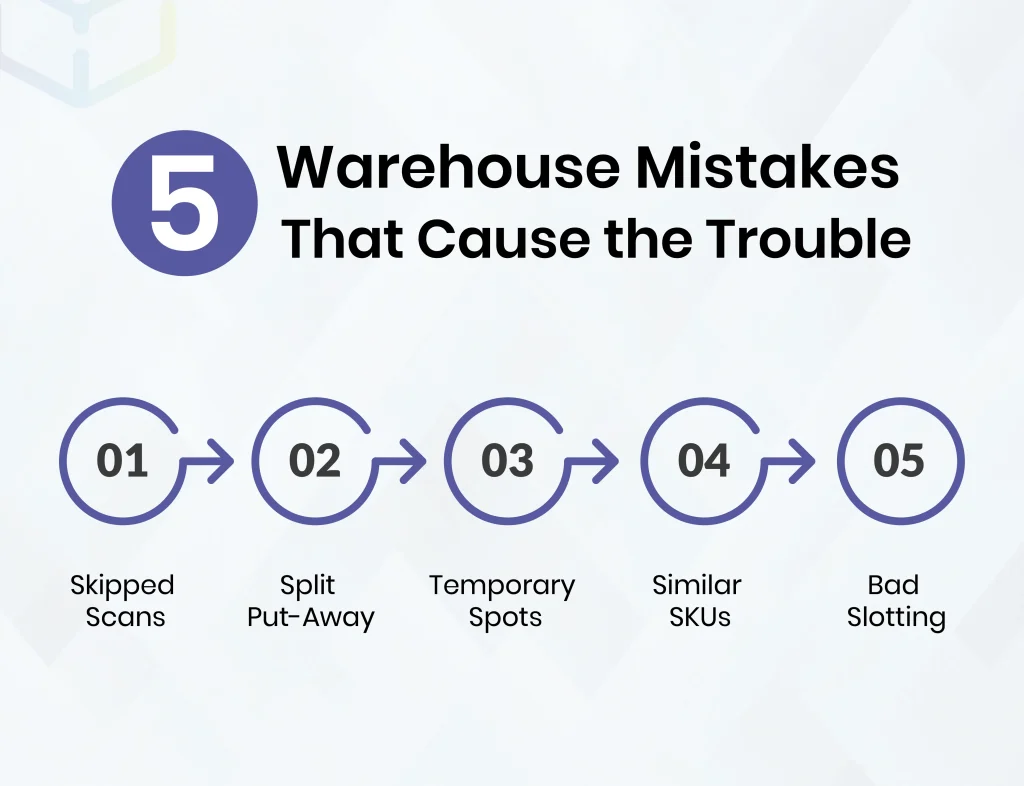
Wrong carton pickup and customer complaints are noticeable warehouse mistakes that surface every now and then. But the more damaging errors often stay quiet and escalate suddenly, they are like small weak habits that become a natural course of action and afterwards starts affecting the system and takes weeks to get noticed and fixed.
Here’re a few inventory management issues that go unnoticed in most warehouses.
-
Skipped Scans
Skipped product scans are the most common warehouse mistakes because operators perceive it as a harmless shortcut for faster processing based on their knowledge and daily routine. But actually this faster shortcut is a problem as the scan creates a proof in the system but the items are missing from the physical location or they might never entered the system.
-
Split Put-Away
Inbound deliveries get splitted into and stocked at different locations due to rush, tighter space, or ongoing replenishment. Seems normal for a busy warehouse.
It is normal until the split is not confirmed and recorded properly. If not so, then it would become difficult to trace the stock across the warehouse and the inventory management issues start to escalate.
-
Temporary Spots
Every warehouse has unofficial holding areas that aren’t officially designated or administered. At such temporary spots, the pallet gets left for some time and to be picked up later near a staging lane or at the end of an aisle. Later comes and goes but the stock stays there longer than the timeline.
Meanwhile, the stock remains outside the controlled flow and the WMS records start getting affected. A day later, someone is checking the system and assuming the numbers are clean on the system but the product is sitting twenty feet away in the wrong place rather than the correct location.
-
Similar SKUs
Growing businesses have growing product lines that require better warehouse operations as items get hard to handle due to similar labels, colors, sizes, and other packaging specifics.
Similar SKUs get mixed up easily on fast-paced days and at critical zones and become a core reason for a lot of warehouse mistakes where mostly labor gets the blame on labor when the real issue was poor separation from the start of the process.
-
Bad Slotting
Poor slotting practices complicated the simple job. It creates a gap among the fast moving goods, mixes the similar looking SKUs, and sends fragile goods to less controlled zones. Where as a strong layout and slotting reduces human intervention and put less decision burden on the staff to speed up the process, clear the clutter fast and keep everything on track.
Upgrade inventory control through a strong WMS that comes with with guided workflows, better traceability, and fewer manual workarounds across fast-moving warehouses.
Talk to ExpertsThe Most Frequent Picking Errors
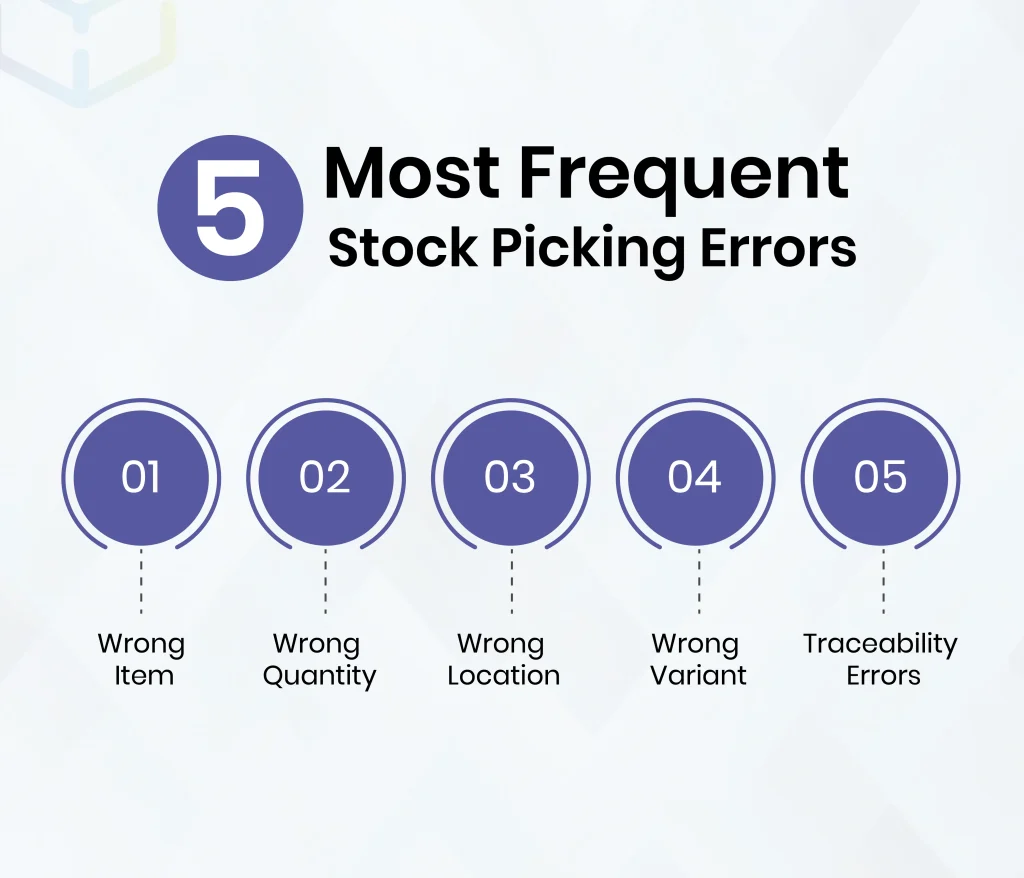
There are multiple kinds of picking errors that don’t always damage directly or instantly but affect overtime. Such as some errors start with affecting customer service first, others distort stock accuracy, and the most expensive ones tend to hit both sides at once, which is why picking errors turn into permanent inventory management problems later. Following are some of the most frequent picking errors that occur which affect inventory management:
-
Wrong Item
Wrong item picks are easy to spot because the error reaches packing, dispatch, or the customer before leaving the facility so it has higher chances of getting noticed. The surface-level issue looks simple as the wrong product might be shipped but underneath, there must be something else off. Either it’s poor slotting, weak scan discipline, or terrible SKU separation in the pick path that causes the wrong item to be picked.
-
Wrong Quantity
Wrong quantity errors look small but creates more disruption. Short picks delay orders and overpicks create a fake stock balance on the shelf. Once a wrong quantity is picked by one picker, the next picker will get incorrect information from the WMS. One small quantity error snowballs into wider inventory management issues within the same day.
-
Wrong Location
During rush hours when the assigned bin goes empty, pickers grab items from a nearby bin that has the same product stock. A picker does that to save time and keep the workflow alive. Eventually, the picker saves the order, but the record does not follow the move properly, so the next task starts from a false location history. Wrong picks from different locations start confusion across the aisle.
-
Wrong Variant
Often expanded product lines have similar sizes, colors, pack types, and model variants that are placed closely in the warehouse. In a rush, people pick what looks right and do not always what scans right. Fast-moving areas with weak visual separation are full of this risk. Wrong-variant picks are one of those warehouse mistakes that look small until returns, complaints, and recounts start piling up.
-
Traceability Errors
Lot, serial, and expiry mistakes have bigger consequences. Because this time it isn’t about just accuracy but raises concerns over product control protocols in the facility. In pharma, electronics, and automotive operations, one wrong scan can create a compliance issue, a warranty issue, or a serious recall risk. Such mistakes are hard to trace and often end up in audit trail damages.
How to Reduce Picking Errors in Warehouses?
Most warehouse teams answer how to reduce picking errors with more checks and more approvals that eventually adds more friction. More measures sound disciplined but actually slows the floor and gives people more steps to work around.
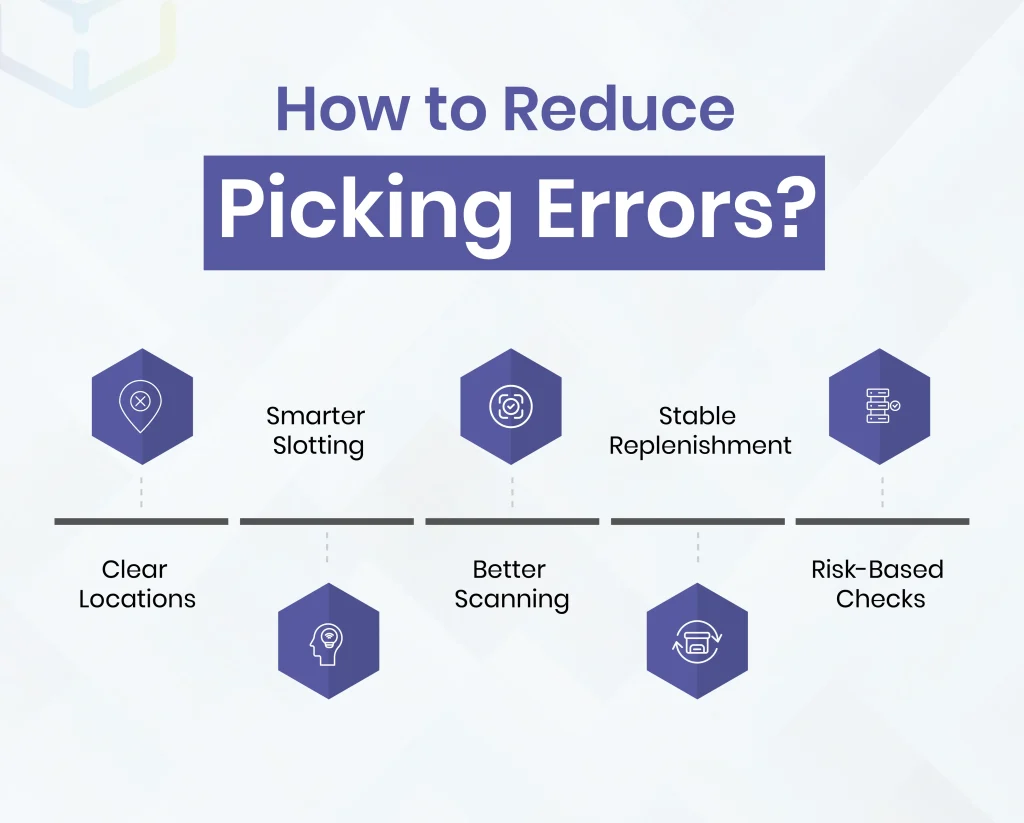
A better approach is simpler. Remove the conditions that make bad picks likely in the first place. Here’s how to reduce picking errors.
-
Clear Locations
Readable locations make a huge difference. To fix picking errors, make bin labels obvious, easy to navigate aisles, and better shelf positions that support quick decisions. When a picker has to stop and second-guess a location code, the process is already weaker and time-taking. Clear locations not just reduce inventory errors but improve productivity.
-
Smarter Slotting
Lookalike SKUs should not be packed side by side unless there is a strong operational reason. Fast moving goods should be placed in practically relevant zones that are easy to reach and easy to replenish. At high-volume operations and tighter timelines, good slotting practices strip away inaccuracies.
-
Better Scanning
Visual checks alone are not enough for lot-sensitive, serial-controlled, or lookalike items. Barcode validation adds a stronger layer of control right at the point of action, whether receival, put-away, or dispatch. Catching the wrong item before it leaves the slot is always better than tracing it back after dispatch.
-
Stable Replenishment
Replenishment must be well-planned and timely. Empty picks face huge disruption and even serious damages. Reserve stock can handle the situation, but once the forward location runs dry, rushed substitutions begin. Reliable replenishment keeps the pick face ready and removes one of the most common triggers behind picking errors.
-
Risk-Based Checks
Every SKU does not need the same level of control. High-value, fragile, regulated, or high-variance items need tighter verification and controlled handling. Low-risk stock can move with less friction, quickly. That is how efficient warehouses balance inventory flow. Overchecking everything slows the process and underchecking the risky stock creates preventable mistakes, so balance is the key.
See how WareGo helps teams cut rework, improve stock confidence, and keep shelf data aligned with live records.
Book NowHow to Fix Inventory Issues Without Stopping Operations
Once accuracy slips, many teams jump straight to a full recount which most of the time comes as an instant reaction. A recount shows the size of the gap but rarely shows why the same gap keeps returning.
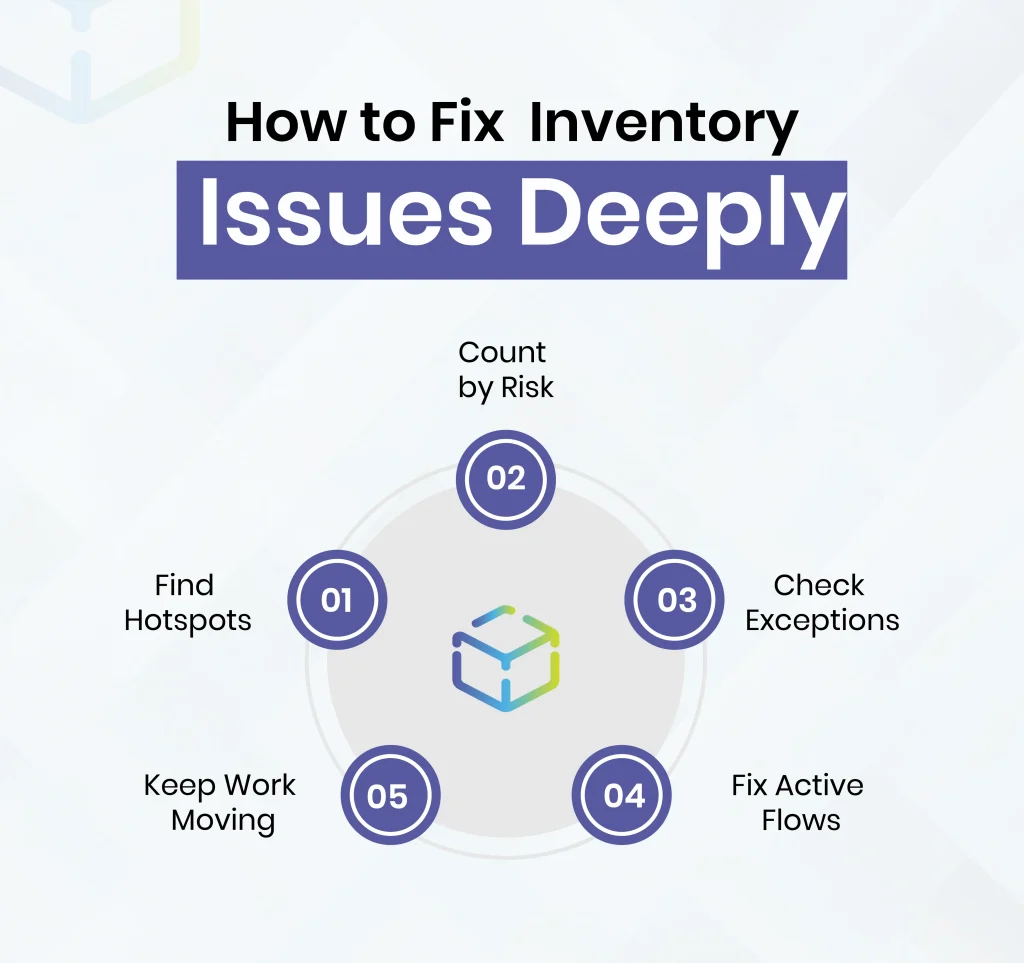
Anyone trying to learn how to fix inventory issues should start with targeted control instead of facility-wide disruption.
-
Find Hotspots
Frequent stock adjustments usually point somewhere useful and significant. Same goes for locations with repeated variance and zones where short picks happen more frequently. Hotspots reveal where there is loss control and where the protocols break first. Start from that very point, not all over.
-
Count by Risk
Fast moving goods, high-value stock, and unstable locations need more attention and frequent checks. But slow, low-risk inventory does not need to be treated the same way. To avoid and fix inventory management issues, smarter cycle counting gives far better results than trying to count everything with equal intensity.
-
Check Exceptions
Every inventory error that causes returns, damages, short picks, or incomplete transfers leaves a clue. Dedicated stage for exception review helps expose the moment where record mismatch actually takes place on the floor. Once that moment of error becomes visible, correction becomes more accurate, much faster, and sustainable and results in optimal performance.
-
Fix Active Flows
Obvious weak points must be fixed instantly rather than carried forward to the quarterly reviews because there might be a single error that in the workflow that is breaking stock status over and over again. Handling the active failure point is how inventory management problems get reduced without freezing the whole warehouse operations.
-
Keep Work Moving
Stopping operations is not the smartest move in the books to fix inventory issues. It’s better to isolate the parts of the workflow that generate bad data to improve control while the rest of the warehouse keeps functioning as per schedule. Making focused repair is more practical way to fix inventory issues without creating a second problem because of delay caused while fixing one.
Move beyond reactive counting with live tracking, better verification, and workflows designed to reduce avoidable warehouse errors. Get an in-depth WareGo demo with personalized use cases to understand the advantage.
Book a DemoUse Technology to Bridge the Gap
Better inventory accuracy comes from better transaction capture on the spot when a certain task happens. Good technology does more than storing stock data after the fact. Adequate technology like inventory management software helps prevent bad moves while the user is still making the best decisions.
-
Better Capture
Movement data must be captured cleanly and immediately. Manual typing and memorizing tasks to update on create too much room for distortion and inaccuracy. Using Barcode and RFID tools reduce that risk by confirming what moved, where it moved, and when it happened and stores all data instantly to the WMS.
-
Early Alerts
Small mismatches are much easier to fix than bigger ones if get an eye earlier. Quick alarms like cycle count triggers, discrepancy alerts, and exception rules help staff reduct surface problems before they repeat or grow into bigger ones.
-
Live Visibility
Many errors do not come from one wrong bin alone. Delayed updates, disconnected systems, and weak visibility across zones create the bigger problem and mismatches. Real-time inventory tracking via WMS helps teams see what is available, where it is stored, and whether the record still matches physical stock or not.
-
Full Traceability
It is easy to track stock movement when lot tracking, serial tracking, and multi-location are clearly visible in one dashboard. Fast-moving and high-volume environments especially need full clarity. Clear trails reduce the guesswork and improve error detection during investigations, recounts, and compliance reviews.
-
Guided Work
Strong systems reduce unprofessional and self-driven floor behavior and guide users towards the right item and right location with clear next steps defined for all. Guided workflow is a practical and useful tactic to reduce inventory management issues as most of the hidden warehouse mistakes begin when the process becomes too loose and too dependent on individual judgement rather than clear, system-defined SOPs.
How WareGo WMS Helps Reduce Pick & Inventory Errors?
WareGo Warehouse Management Software is designed for live warehouse control rather than just static reporting after the issue has already occurred in earlier stages of inventory operations. With live control, WareGo eliminates most inventory management problems that begin during daily execution on the floor instead of letting the error pass through to the ending stages.

-
Live Tracking
Real-time inventory movement tracking helps teams record stock changes quickly during live operations after each and every movement. Fast and direct updates on the system reduce mismatch between physical shelf stock and WMS data.
-
Faster Capture
Barcode and RFID features in WareGo help reduce manual entry errors and scan-related gaps in operations across receiving, put-away, transfers, and picking. Clean transaction records make movement easier to verify, harder to distort, and eventually reduces all inventory management issues.
-
Earlier Flags
WareGo offers regular cycle counts, synced updates, and discrepancy controls to help teams spot smaller issues early on in the workflow. By providing early red flags, WMS automatically gives alert to correct the issue’s source without leading to major escalation.
-
Better Control
Bin-level, lot-level, and also serial-level traceability gives teams a more exact view of where stock is present currently and what status it carries. Sometimes things move too fast. High-volume operations with fast movement or multiple product variants benefit get more accurate with mulit-level, enhanced control. Because without the right data, you’re just guessing where the pallets went.
-
Connected Accuracy
WareGo connects inventory tracking with replenishment, picking, traceability, and day-to-day execution activities across the warehouse. An interconnected process with better control reduces the room for inventory mismatch and makes the smallest of the errors noticeable. Connected workflow is a stable way to reduce repeated recounts, warehouse mistakes, and improve control over time.
Walk through receiving, put-away, replenishment, picking, and counting flows with a WMS setup designed for specifically operational clarity & warehouse accuracy.
Book DemoFinal Thoughts
If physical shelves and WMS do not match, the issue is bigger than missing stock. The mismatch means at least one part of the warehouse execution chain is generating false information faster than the team corrects it. A proper course of action is required to fix picking errors and inventory issues in such scenarios of inaccuracies rather than just recounting all the stock.
Once inventory management controls come in place, inventory reconciliation stops feeling overwhelming. It will start becoming a routine. That is the point where the warehouse gets its accuracy and efficiency back.
FAQs
How do you improve inventory accuracy in the warehouse?
To improve inventory accuracy, warehouse operators must tighten the activity where stock changes state or location, ensure better receiving checks, scan-based confirmation during put-away, disciplined replenishment, cleaner returns handling, and targeted cycle counts. Also, keep slotting and item data accurate to avoid mistakes.
What are the most frequent kinds of picking errors?
The most frequent picking errors are wrong picks from item, quantity, location, and variant. Short picks are also common that is caused by stale location data on the system. Poor replenishment timing, bad slotting, and weak barcode confirmation are core causes of picking errors.
What are the human errors in warehousing?
Common human errors include:
- Skipped scans
- Incorrect put-away
- Confirming moves too early
- Picking from the wrong slot
- Misreading similar labels
- Placing returned or damaged stock into active inventory
Most human errors occur when people try to save time but often become routine practice and weakens the process.
Why do physical counts never match your WMS?
Counts usually do not match due:
- Incorrect stock is receival
- Goods moved without confirmation.
- Items picked from the wrong slot
- Product returned without inspection or written off too late.
All these mistakes cause mismatch in earlier stages of warehouse operations but the errors are only noticed during counting. Hence, recounting isn’t the permanent solution but a complete process optimization.
How to reduce picking errors without slowing the team down?
Start with the major causes that create unnecessary, additional decisions for pickers.
- Separate similar SKUs
- Improve slotting
- Clean barcode mapping
- Make replenishment more reliable
Then add scan validation layer only on higher-risk items rather adding unnecessary friction to less sensitive items. These measures won’t slow down the process but make it more efficient.
How to fix inventory issues when the warehouse is already busy?
Do not begin fixing inventory issues with a facility-wide shutdown. Always, start with high-variance zones with fast movers and frequently adjusted items to clean the core errors first then add bigger other sub-errors that aren’t meant to be there in the first place. A focused recovery plan works better than a giant count that interrupts overall operations.